
Table of Contents
Linux/BSD
I run Artix Linux on my personal computers. While I was initially compelled to make the switch thanks to SystemD's age attestation support, I actually found that OpenRC is simply much easier to work with. SystemD's command line utilities feel overdone and unintuitive to use, because it tries to do everything at once. In contrast, the simplicity and zen that I feel operating OpenRC services cannot be overstated. I'll happly use Arch Linux if I have to, but when given the chance to use OpenRC over SystemD.
After switching between a few Linux distributions for my server, I settled on FreeBSD, as it is one of the most stable, predictable, and consistent operating systems to-date. Jails is a pleasure to work with, and doesn't overcomplicate containers like Docker or Podman do. Firewalling through pf is intuitive, and configuring networks with ifconfig is extremely powerful and integrates nicely with everything else in the operating system. The most import thing is than unlike Linux which ships just a kernel, to which you add components like GNU, firewall, etc on top of; FreeBSD is an all-in-one, with the entire software stack built-in together. Kind of like what SystemD should be.
DWM/DWL
On my desktop, I run DWM with Xorg. Because I'm lazy, I don't have any patches, or even a status bar. Yes, that means every time I want to check the time, I have to open a terminal and type date. Not ideal, but honestly, I've found that a vanilla tiling window manager setup makes me extremely productive in a very irrational way. I used to run XFCE, but ultimately made the switch because having the windows on my screen automatically tile made things easier for me to manage.
On my laptop, I use DWL (DWM but for Wayland). It is pretty much the same, but you have to bring your own status bar, but runs much smoother. On my Thinkpad T420, my setup from boot only idles at 200-300MB of RAM, which only changes when I open a browser! Doing anything on Wayland like scrolling, switching tags, moving & resizing windows, and everything else in between feels much, much smoother than it did on Xorg.
I did use Hyprland for about a month, and while I loved configuring it through Lua, it felt weirdly distracting. I'm so used to using a barebones operating system, that switching to something else is far to jarring. Same with most other window managers for Wayland, as they all have the same appearance (rounded windows, pills in the status bar, gradients everywhere, etc). Furthermore, I didn't like the master/slave layout that Hyprland has. For some reason, it behaves slightly differently to DWL, and it bugs me a lot. I'm sure there is a solution to my issues with it, but honestly, who cares. My computer does not have to be flashy to be functional.
Neovim
My primary text editor is Neovim. It works really well on low-end hardware, but most importantly, it's not trying to get in my way. Once you learn vim bindings, you can't go back. You can fly through documents, create quick macros that let you reformat a document, and do it all through just the keyboard. It lets me stay focused with solving the problem, rather than the mental gymnastics of moving my hands around and keeping track of my mouse to click on big buttons. I also generally don't like icon buttons like in VSCode, since sometimes my brain cannot comprehend them if there are too many in a row.
I find that configuring Neovim is fantastic. Because it's so minimal to begin with, you get to choose what you want your text editor should do, not have your text editor decide for you. Other editors like VS Code have so much built into it, that while great to get started quickly, it means you have to spend time to reverse those preset options to get what you want. No, I don't want you to recommend me extensions Microsoft! I will admit that the Neovim docs are somewhat hard to read at times, and there are so many options that take a long time to really understand, but it's a worthwhile read.
Librewolf
For my browser, I use Librewolf. It's a hardened Firefox configuration with the most secure settings by default, and uBlock origin built-in. You can then choose which settings you want to revert, instead of having all your data harvested by default. This means it's really convenient to install it on new computers, virtual machines, etc., where I won't have to flick through the Firefox settings to harden it, and download uBlock origin each time.
In practice, Librewolf will clear your history and cookies when you exit automatically. Furthermore, while searching, it won't give you "search suggestions" from your search engine (only bookmarks, tabs, etc). Funnily enough, after using this browser for a bit, even though I have to sign into websites every time, I couldn't go back! Here are some things you'll have to get used to, but will pay off long term:
- It teaches you to use the web logged-out
- It makes social media algorithms/feeds, and other random distractions less effective
- For the sites you need an account for, use a password manager, so logging into websites isn't a pain
- You learn to use bookmarks or memorise website URLs, as opposed to searching on DuckDuckGo for the page you want
With that said, I feel more efficient at navigating the web using Librewolf than I do any other browser. You probably won't understand, until you give it a proper shot.
GrapheneOS
I installed GrapheneOS on my Pixel 4a after a year of using the stock Android OS. It's a hardened version of ASOP (Android open-source project) that is built to respect the user's privacy and security. Just like Librewolf, it's secure by default, and comes with only the bare essentials; not a single Google app in sight. But if for whatever reason you need Google Play or it's AI assistant, you can choose to install it.
A lot of people belive this psyop that Apple is the most secure of all, but they're not the most private! When you take a look at the security measurse GOS has in place, you'll realise that it is just as, if not, more secure than Apple. So going the GOS route, you get privacy by not having Google or Apple install random apps on your phone every update, and security in the same package.
I have eradicated probably 95% of all proprietary software from my phone, with Proton Mail, MullvadVPN remaining. All of the other apps I have installed are purely utilitarian and installed through F-Droid. This makes sure that my phone remains a communications device, and not a playground of distractions, as it was intended.
GIMP
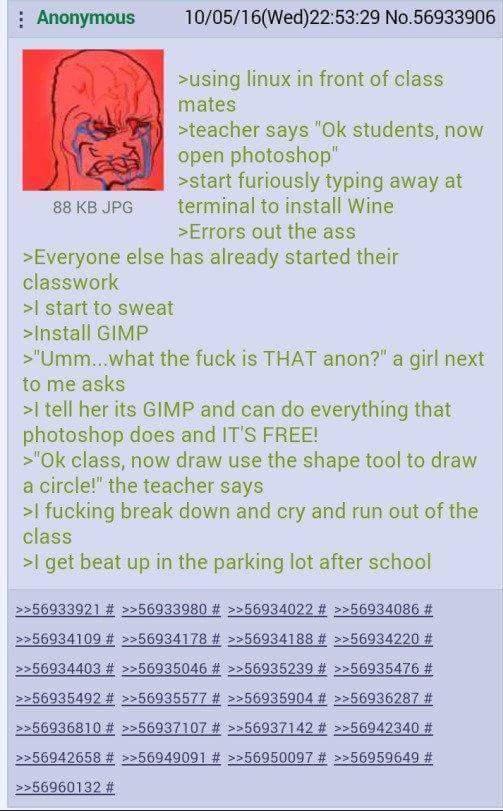
I started off by using Photoshop to make random memes/shitposts when I was in high school as part of a tech elective. I became very proficient at it, having memorised plenty of shortcuts and techniques letting me do really cool stuff with it. But after switching to Linux, I realised I had to use Gimp... which as we all know, looks quite "different" when compared to it's bloated alternative.
Once you familiarise yourself with a few of Gimp's quirks, such as for the one or two times you actually have to make a perfectly round circle, it's not that bad. For something you can install for free on any Linux distribution, you have to admit that it's really good. Not only does it have 90% of the features Photoshop has (apart from the auto background removal thing), but it works on any system. Whenever you run Photoshop, you're committing all of your system resources to that one program. But with Gimp, you can feel how lightweight it is.