09/11/2025 • How I built the matchsticks game in ARM
Table of Contents
The Project
For the project/assignment, I was tasked with creating a game of in ARM assembly. I would use the ARMlite simulator for the as it had a nicer input/output display and I could easily view program's memory and registers. The code can be found on my Gitlab repository as usual. The game itself is as:
- A player is to take turns against a computer/AI
- The player must configure the game with their username and number of matchsticks (from 10-100)
- The player and computer take turns to take 1-7 matchsticks from the total, until there are 0 left
- Whoever takes the last matchstick loses
- The player can restart the game with yes/no
- Optional: There must be a graphic to show the amount of matchsticks remaining, and when you win or lose... which I of course did
This was done for a first-year unit, so I talk a lot about how my isn't written by ChatGPT. I wanted to stress this because my tutors about how so many students in 2023 had used it to complete their , and I ain't no LLM scrub. I write things myself for the enjoyment programming, not for the unit.
Code Formatting and Structure
If you have ever written any kind of machine code yourself, you'll that it is extremely verbose. Instead of decorating your code with , functions, variables, etc, you simply write what you want to from top to bottom, and hope for the best. As a result, I needed to some ground rules for documenting the assembly code (on top of the ABI specification) to ensure I can within the .asm . I ended up on the following rules for the program:
; ------------------------------------------------------------------------------------------------------------------------------------------------------------------------------------------------
;                                                                                   THE MATCHSTICK PROGRAM THAT COULD
; ------------------------------------------------------------------------------------------------------------------------------------------------------------------------------------------------
; Programming Style:
;   - Functions are to have the following syntax:
;       ; FUNCTION -<gt; [function description
;       ;       IN -<gt; [list of all variables/registers needed]
;       ;      OUT -<gt; [list of all output variables/registers used]
;   - Registers that are to be used/reserved throughout the code must be explicitly commented
;       MOV R0, #0 ; REGISTER 0 -<gt; [description of what this is reserved for]
;   - Loops, inner functions, or nested labels are must have their parent label appended to the end of them,
;       test_function:
;           ; ...
;       test_function_loop:
;           ; ...
; ------------------------------------------------------------------------------------------------------------------------------------------------------------------------------------------------

MOV R12, #0       ; REGISTER 12 -<gt; Messages to print
MOV R11, #0       ; REGISTER 11 -<gt; Current matchstick count
MOV R10, #game_player_name ; REGISTER 10 -<gt; Player Name
MOV R9, #0        ; REGISTER  9 -<gt; Player Turn (0x1 for player, 0x0 for computer). Starts with computer, but will flip instantly on new_turn
MOV R8, #0        ; REGISTER  8 -<gt; Amount to subtract from Matstick Count (REGISTER 11)
MOV R7, #0        ; REGISTER  7 -<gt; Staging matchsticks (store R11 - R8 in this register and check if the value is valid)
MOV R6, #0        ; REGISTER  6 -<gt; SET matchstick count


; ...
I did this about 6 months after writing this page, so I cannot tell you why I chose that absurd column length!
Upon that, I designate certain parts of the file using this same style of documentation, such as "GAMEPLAY LABELS/FUNCTIONS" which "contains labels that don't deserve to be functions, but help encapsulate some functionality in a nice area", and "END MAIN PROGRAM LOOP, BELLOW ARE STRICTLY FUNCTIONS". That way, I can better scale the code with more without becoming overwhelmed. Even the 200 lines of (actual) code stretches what you can properly comprehend at once, so designating parts of the file helps. It also helps other people reading the code to navigate the file, especially since the tutors who had to mark mine also had hundreds of other people's code to read. The horror. These are just some of the things you have to keep in mind when developing assembly code
Programming the game
Setup & New Game
The first 20/40 lines of the file is just register soup and configuring the game, so nothing special. Then, we reach the new_game label. This gets called when the program first starts, and when a game finishes and the player decides they want to play again, and all it does is set the current turn to the player, reset matchstick count back to what it was, and updates the UI. You can tell that I wrote this and not an AI because of all the wonderful comments I left for myself. I truly am the master of documentation.
new_game:
    STR R0, .ClearScreen
    MOV R9, #1        ; Set turn to player
    MOV R11, R6       ; Set current matchstick count to set mc
    MOV R8, #0        ; Reset amount of matchsticks to subtract

    ; Display the matchstick ui
    MOV R0, R11
    MOV R1, R8
    BL matchstick_removed_anim

    B attempt_turn    ; Running that code will flip the player to something else, causing unnecessary CPU cycles (look at me and my big words)
new_turn:
    MVN R9, R9        ; Flips all of the bits in R8. However, this also means the bits ahead of the first one are also flipped
    AND R9, R9, #1    ; Bit mask the first bit to solve said issue
attempt_turn:           ; WHY DIDN'T I JUST AMKE THIS A FUNCTION I'M SO SORRY THERE ARE SO MANY LABELS I HATE ASSEMBLY PLEASE SOMEONE PULL ME OUT OF THIS SEA OF TEXT
    ; If player turn = 1, branch to player_turn. Otherwise, branch to computer turn.
    CMP R9, #1
    BEQ player_turn
        BNE computer_turn
turn_complete:
        ; ...
The attempt_turn label branches to the function player_turn if register 9 is equal to 1, or to computer_turn otherwise. Because I had documented what each register does, I don't have to tell you what is in R9, you can just find out! You might notice that the "functions" aren't actually functions, they are just simple labels because I don't branch/link using BLEQ . That is because if / else statements don't exist in ARM! When you execute the CMP (compare) command against two registers, the result gets stored in 4 status bits, N , when the operation results in a negative value, Z for zero, C for carry, and V for oVerflow. Therefore, BEQ means "branch if EQqual" and BNE means "branch if NEgative".
The Computer
; TODO - Should be a function and not just a branch? Probably a good idea. I'm lazy. Hi Lazy, I'm Dad. How are you doing, Dad? Not to good, Lazy. Why's
;        that, Dad? Well I had a punch line but lost it in the mess of spaghetti assembly code. Can you help me find it? Please stop talking to me Dad
; Future me - why is this a function again? Why don't I document that instead of rants
computer_turn:
    MOV R12, #msg_computer_computers_turn
    STR R12, .WriteString
    BL get_computer_input
    MOV R8, R0
    CMP R8, #0        ; If computer randomyl generates 0,
    BEQ computer_turn ; Branch into computer_turn and do it again.
    MOV R12, #msg_computer_selected
    STR R12, .WriteString
    STR R8, .WriteSignedNum
    MOV R12, #msg_computer_removed_matchsticks
    STR R12, .WriteString
    B turn_complete
; FUNCTION -< Gets input from the computer. Will be a random number. The random number will be put into an AND gate to ensure that no
; values above 7 are selected
; IN -< min, max
; OUT -< input
get_computer_input:
PUSH { R4 }
MOV R2, R0
MOV R3, R1
LDR R4, .Random
; Performing an AND operation will get rid of all bits, discluding the ones selected. What that means is if I only want to select the
; first 3 bits on a 10 bit string (say, only first 3 bits on 101101010111), then doing A & B = (000...000111). This is called bit masking!
; I swear this was not generated by ChatGPT
AND R4, R4, #7
MOV R0, R4
POP { R4 }
RETThis code also shows how the computer generates a random value for it's turn. It loads into register 4, the value of .Random which is just a random set of bits. We then bitmask the result of that number which the comment describes "performing an AND operation will get rid of all bits, discluding the ones selected. What that means is if I only want to select the first 3 bits on a 10 bit string (say, only first 3 bits on 101101010111), then doing A & B = (000...000111)."
get_computer_input is also the first instance of using the stack in this program. The ABI for ARM (if I recall correctly) states that a program should reserve 4 registers (R0 - R3) for function parameters and return values. If more registers are used, their values should be pushed onto the stack, and popped before returning. The stack is best described as a real life stack of plates. For example, you cannot take the plate from the middle out, you have to take all the plates on top of it before you do that otherwise your computer will blow up, your peers will look at you strangely, and parts of the universe might collapse into itself.
Functions should always be in charge of pushing and popping values from the stack, not the caller. If you BL in a function, then wherever you branch should do the same and push/pop values itself. If the caller had to do it, then your code would probably have more PUSH / POP calls than actual assembly. You might also not push the correct amount of registers onto the stack, and some of them might be overridden with junk! That would be an absolute nightmare to debug! Its best to reduce the amount of cognitive load in your main program loop as much as possible, so the less duplicate code the better.
The Player
player_turn:
    ; Display "Player (game_player_name), there are (R11) matchsticks remaining
    MOV R12, #msg_player
    STR R12, .WriteString
    MOV R12, #game_player_name
    STR R12, .WriteString
    MOV R12, #msg_player_there_are
    STR R12, .WriteString
    MOV R12, R11
    STR R12, .WriteSignedNum
    MOV R12, #msg_player_matchsticks_remaining
    STR R12, .WriteString
    ; Get matchsticks to remove from user
get_player_input:
    MOV R0, #1        ; Minimum
    MOV R1, #7        ; Maximum
    MOV R2, #msg_player_how_many_to_remove
    BL get_num_between
    MOV R8, R0
    B turn_complete
; FUNCTION -<gt; Returns the input of a number between [min] and [max], and prints the message [msg]
; IN -<gt; min, max, msg
; OUT -<gt; input
get_num_between:
PUSH { R4, R5, R6 }
MOV R3, R0 ; Min
MOV R4, R1 ; Max
MOV R5, R2 ; Message
get_num_between_loop:
; Get Number
STR R5, .WriteString
LDR R6, .InputNum
; Check if num is greater than min
CMP R6, R3
BLT get_num_between_loop
; Check if num is less than max
CMP R6, R4
BGT get_num_between_loop
MOV R0, R6
POP { R4, R5, R6 }
RETI probably should have mentioned this earlier, but ARMlite has an input box which you can read from. Whenever you want to print some text, you simply store a memory address of some text into .WriteString , and the simulator will print those bits into a display box for you. Neat! With that said, The player_turn label is responsible for printing messages and then getting the player's input. Initially, the player's input would've been done in a separate function, but for some reason I never really did anything with it so I combined the two functions and left the label there for some reason. A bit of organisation will never hurt anyway, I can just comment it out in the future.
The get_num_between function will load (LDR) the value from .InputNum into register 6 and check to make sure its in between the min and max parameters. If it is, it will move the input into register 0 and return from the function. The caller can then move register 0 and do whatever it needs with it. In this case, it simply moves it into register 8 and we move on to the next part of the program, turn_complete
Completing a turn & win conditions
turn_complete:
    SUB R7, R11, R8   ; Subtract the current matchstick count to the input/rng into a separate register so that we don't override the current mc count with negative numbers
    CMP R7, #1
    BLT attempt_turn  ; If the amount of matchsticks remaining after subtraction is less than 1, then that is an illegal move
    MOV R11, R7       ; The value selected is valid, store it in register 11 indefinetely
    CMP R11, #1
    BEQ check_winner
    BLT draw
    MOV R0, R11
    MOV R1, R8
    BL matchstick_removed_anim
    B new_turn        ; Otherwise new turn (game is still going)
check_winner:
    ; If it is 1, then the player who's turn just occurred is the winner (i.e, they have forced the other player to pick up a single
    ; remaining match stick
    CMP R9, #1
    BEQ player_win
    B computer_win
    B new_turn        ; Loop until CMP R11 <= 1, in other words, until there are no more matchsticks
This is where the complexity starts to happen
Remember that we are building a game about matchsticks, where 2 players remove x matchsticks until there are none remaining. At this stage of the program, we want to calculate how many matchstick remains from the player or computer's turn (using SUB for subtract) which is stored in the magical register 8, and store it in register 7. If the remaining amount of matchsticks is negative, then we consider that an illegal move and go back to attempt_turn which allows the player or computer to retry their turn. Because we stored that subtraction result in a different register, it will never be applied to the current amount of matchsticks, which is why we have that designated register!
If the value is legal, then we continue and compare the current amount of matchsticks to 1, then someone won. If the amount is less than 1 for some reason, then it will be a draw which is impossible anyway. In hindsight, I should have removed that condition since its impossible for it to ever be called. Because check_winner and draw aren't functions with RET , we can safely update the user interface without another label and just execute matchstick_removed_anim and then branch to new_turn and repeat!
player_win:
    MOV R12, #msg_player_win
    STR R12, .WriteString
    BL ui_smily_face
    B check_winner_finish
computer_win:
    MOV R12, #msg_player_lose
    STR R12, .WriteString
    BL ui_sad_face
    B check_winner_finish
draw:
    MOV R12, #msg_draw
    STR R12, .WriteString
    BL ui_sad_face
    B check_winner_finish
Assuming someone one, one of the labels from above will be executed. all these do is print a message to the console, display a smiley or sad face, and then executes the check_winner_finish which just checks player input to see if they want to play again (y/n).
This could have been a single function with 2 arguments, and instead of having 3 labels, just pass in those arguments... but this isn't C... you would actually use the same number of lines to achieve the same thing. Remember, to call a function, you can't just specify the arguments. They don't exist. You have to move the values you want as parameters into some arbitrary registers that might or might not be the right ones! You have to do the following things to use a function for this use case:
- Compare the current amount of matchsticks to 1
- If the player wins...
- Store into register 0, the message
- Store into register 1, the address of the label you want to branch to in order to display the smiley/sad face
- Branch link to the function
- Store the contents of register 0 (the message) into
.WriteString - Branch link to the memory address stored in register 1
- Store the contents of register 0 (the message) into
- Branch back to
check_winner_finish
- Otherwise if the computer wins...
- Store into register 0, the message
- Store into register 1, the address of the label you want to branch to in order to display the smiley/sad face
- Branch link to the function
That is a lot more work than just 3 separate labels. "You C developers and your if statements." You know what, why didn't I just write the program in C and compile it into ARM ASM?
Visual Effects
This was the last part of the assignment as was optional. Not only is this the thing I spent the least amount of time working on, I also regret one of my solutions as I was bullied by an actual programmer about how stupid my solution to UI was. There were 2 things that had to be done: 1 was a matchstick UI showing the current amount of matchsticks remaining, and the other was a win/lose screen.
Current Matchsticks Display
This code was fine, and does the job.
; FUNCTION -> Displays an animation of new_matstick_c having removed_matstick_c being removed with red flashing lights
;       IN -> new_matchstick_c, removed_matchstick_c
;      OUT -> ...
matchstick_removed_anim:
    PUSH { R4, R5, R6, R7, R8 }
    MOV R3, #0        ; REGISTER 3 CURRENT INDEX     | Current index
    MOV R4, #.PixelScreen ; REGISTER 4 Pixel Screen
    MOV R5, #.black   ; REGISTER 5 Colour
    MOV R6, #0        ; REGISTER 6 CURRENT INDEX * 4 | Memory aligned current index
matchstick_removed_anim__current_loop: ; Loops through until R0 = R3
    LSL R6, R3, #2    ; Calculate MEMORY ALIGN index, so multiply by 4
    STR R5, [R4 + R6] ; Get the pixel located at the new index
    ADD R3, R3, #1    ; Finished drawing line, increment index
    CMP R0, R3        ; If the current index is greater than the new_matchstick_c, then change the colour to red
    BGT matchstick_removed_anim__current_loop
    ADD R0, R0, R1    ; Add the removed_matchstick_c so that we can loop until it reaches this value instead, but in RED this time
    MOV R5, #.red
matchstick_removed_anim__removed_loop:
    LSL R6, R3, #2    ; Calculate MEMORY ALIGN index, so multiply by 4
    STR R5, [R4 + R6] ; Get the pixel located at the new index
    ; Finished drawing line, increment index or wahtever i dunno
    ADD R3, R3, #1
    CMP R0, R3        ; Check if current index is less than loop count. If it is, simply go to the next index
    BGT matchstick_removed_anim__removed_loop
    POP { R4, R5, R6, R7, R8 }
    RET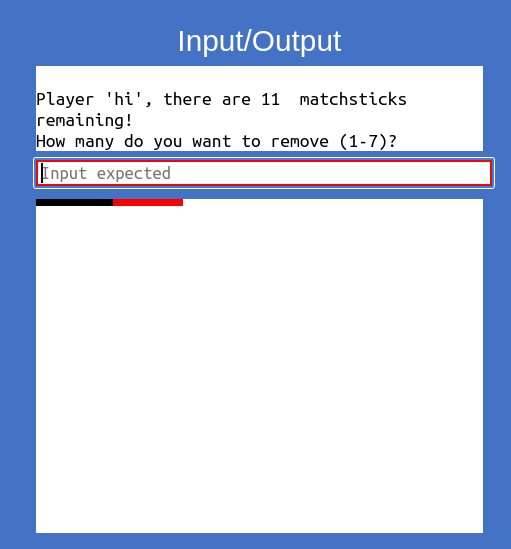
Image of game in progress, and remaining matchsticks graphics
OK, ok, it doesn't actually flash, and there is also a bug with this code, but it still works OK! In order to understand the code, you must first understand how arrays work in assembly, and that is that arrays don't exist. In ARMlite, you can display a pixel to the screen by writing an RGB value (or predefined colours) to a memory address in
#.PixelScreen. That memory address is the first pixel of the screen, and in order to access the pixel in front, you have to go to the next memory address in front of it. Because ARMlite is 32 bit, or has words of length 32 bits, or 4 bytes, we can easily move to the pixel we want by just... multiplying target index by 4. So the 6th pixel of the screen would be #.PixelSreen + 4 * 6) , or using array syntax + pseudo code, [#.PixelScreen + i * 4] .
So with that context, The solution works by looping from 0 - the current amount of matchsticks, and then from there to the amount of removed matchsticks. It does this by firstly allocating a register for the current index for the loop, and then looping until it reaches new_matchstick_c within the first label, matchstick_removed_anim__current_loop . Simply, for each index, it multiplies the index by 4 to align it with each word, and then storing the colour in register 5 into #.PixelScreen + that new memory aligned index. Ugh I hate explaining this. Are you actually reading this, or just absorbing the words? You know what, I'll just let the comments explain the rest.
Win/Lose Screens
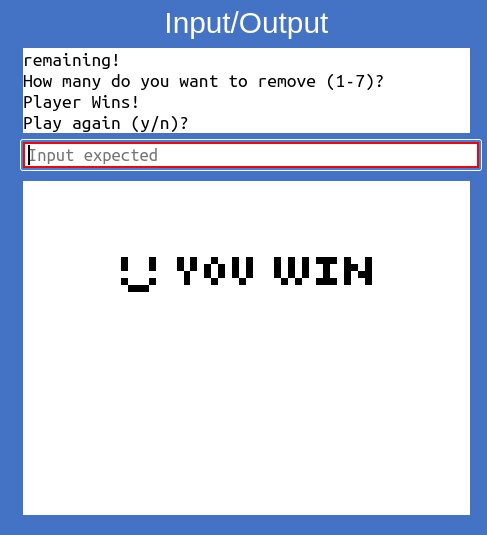
For the record, I just wanted to get this program done so I could work on other assignments, and its not like I'm going to come back to this code work on it further (Though I can if I so desire). For the win/lose screens, I just wanted to display a graphic that wasn't just lines. It was to be pixel art of "you win" and "you lose". My solution was to use a Python script to loop through all pixels in an image, and manually print the STR #.black, [#.PixelImage + index] lines for each pixel that is black. Its as bad as you think.
![Very poorly optimised way of storing graphics with long list of STR#.black, [#.PixelImage + index]](/img/article/2024-12-armlite/lots-of-strs.jpg)
Yeah...
So as it turns out, I could have just stored a stream of bits, 1s and 0s, where 1 = white and 0 = black, and then just had a loop in ASM to select the colour to display based on the stream. I'll leave it at that.
Thoughts about ARM Assembly
This was a fantastic assignment, and I loved every moment of it. Learning about why languages like C exist from a hands-on perspective was fun. The things we take for granted like variables, type safety, arguments in methods, etc., you don't get in ASM. I wrote this page about 6 months after completing it, and re-reading the code I wrote was an interesting experience. Though I wouldn't say I did a fantastic job, I really liked the way I documented all the code. It helped me understand what’s going on.
This is in contrast to higher level languages where you can design your code to be the comments. ARMlite had a few limitations which I had to get around manually, such as no MULT or multiply command. In order to calculate the memory offset for accessing elements in arrays, I had to use LSL which does a bit shift to the left, effectively multiplying a value by 4. It makes me interested in how other ARM manufacturers like Qualcomm or Apple implement the ARM spec themselves. Though, it is time to put this project to rest.